Computer Games Engine
What is a games engine?
A games engine is a piece of software which has been designed for the development of a game. There are many games engines out there and more still being developed; some of them are user friendly so that the public can use it with ease and develop their own games, like UDK and Game Maker. Others are not so user friendly and difficult to use, and some are not even released for public use. These engines are have to ability to create games for all types of platforms, e.g. computer, console and mobile devices. However there are two different types of games engines licensed games engines and bespoke's games engines.
A licensed games engine is a games engine that has all ready been developed to create a game on. An example of a licensed games engine is UDK, this engine have been used to develop the game Bioshock and is available for the public to use.
A bespoke games engine is similar to a licensed games engine in the way they develop games, but the main difference is that a bespoke games engine is created specifically to build a certain game. The engines are usually not available for the public to use because the creators have developed the engine from scratch to specifically build a certain game. An example of a bespoke's games engine is Frostbite, games engine was used to develop the game Battlefield. It was created specifically for this game because the creators needed a destruction and high lighting rendering system.
Game Maker.

A games engine that I have used before is Game Maker. This engine is very user friendly and easy to understand, it did not take me very long to understand how to use it. This is because the
interface is easy to get used to and once you have learnt where everything is located to its easy to remember. When you first open it up it looks slightly confusing in the way everything is laid out, this is because there is not much to work with at first. After a few tutorials you will easily understand how it works, to the right of the page is where is the key items that build up the game are, character sprites, background etc. On the top of the screen is where all of the tools are to start creating the game, but there is nothing already made for you to use like characters or other things. The only thing thats is there is help you out is the scripting, these are like puzzle pieces the you fit together to build and event or something, however you can script your own things your self if you want more advanced things to happen.

This engine mainly focuses on 2D game, however 3D games are possible to create but its difficult to and they are limited. For example you can create games like doom. This is because the engine is focust on designing 2D games, therefore a lot of scripting is need to get a 3D game to work. The reason why its easy to develop a 2D game using this engine is because the person using it does not have to code or script anything in an advanced way; there are templates already made and the person just has to drag them to a location for them to work. An example of a well known game designed using Game Maker is 'Spelunky', this game shows the potential that this game engine has especially for a free engine. This game have become very successful on 'Steam' making many sells. The graphics of the games developed with this engine are all based around the ability of the person being able to draw, this is because it uses a blank canvas with brushes and an import system for the person to create the objects, characters, background etc. Using this engine the art styles you can draw in are kind of limited because you cant draw in a realistic art style because the canvas you can create things on have got limited resources.
Scratch.

Another games engine that I have used before is scratch. This engine is similar to how game maker works apart from I think that this is more user friendly. One of the reason why I think its easier to use is because as you launch the software just the colours alone make it more appealing to the eye. The layout is easy to navigate through, on the left is where the script pieces are, this has got tabs dedicated to certain things you want to happen e.g. motion. Under each tab there are puzzle pieces that attach to one another to build up a script, its very easy to get used to and no tutorials is needed to understand it because of how the tabs work. There are somethings already made for you to test out your scripts on and improve your skills. I think that this software is mainly used to teach you how to scrip basically because this software focuses heavily on the scripting layout and provides you with already made things. However you can still make very good and detailed games with it, like Mario.
This engine mainly focuses on teaching you how to script and and creating 2D games. 3D games are not possible to create using this, however I have seen some simulations of 'Minecraft' which is just screenshots of the games put one after another and the player presses the arrow key to make the simulation move. This is 3D however I would not class it as a game. However unlike game maker I could not find any well known game developed in this engine, but there are many community developed games (http://scratch.mit.edu/explore/?date=this_month). To develop games using this engine its very easy, you have pre made things to work with and to create sprites is very easy. To make and event or something happen in the game its easy to, you have tabs dedicated to certain things like motion, under each tab there are scripts in the shapes of puzzle pieces that attach together to make something happen. This engine is a licensed games engine, the same as game maker, however overall I prefer to use game maker because its more based around game development, unlike scratch.
Unity.
 The first 3D games engine I will be looking at is Unity. I have had very little experience using this engine but I am developing my skills by watching tutorials. The interface of unity is confusing the first time you use it because there is not much to work with, there is a lot of empty spaces on the screen making it look like there is not much to work with. On the top of the screen there are the tools required to make the game, like create sphere etc. In the centre there is the scene, this is where everything appears that you create, like the floor or characters. Below the scene there is something called a hierarchy, this is where all of the object go that you create. Next to it is something called the project, this is where all of the scripts go. To the right of the project is something called the inspector, this is where you get all of your information about the object you have selected, like the size of it, textures and position etc. Using this engine requires some knowledge on scripting so if you dont know how to script then you will struggle on developing a game. However if you know how to script then learning the programme will not be to difficult.
 An example of a game developed using this engine is Rust, this game has become fairly successful and is available on 'Steam', the game is "an open world multiplayer survival game, Rust drops players into a hostile environment in where emergent gameplay can flourish. Make friends, craft tools, explore, build homes, and survive." This shows the potential that this engine has got, allowing the player to have complete freedom with what can happen in the game, as long as you know how to script. This engine mainly focuses on 3D games, but 2D games are able to be created however they are difficult to. On the newer version of it they are making 2D games more easier to create. Even tho this can create 2D games I would still prefer to use Game Maker because I know how to use it better, unlike Unity where I do not know to much about it. While creating games using this engine you have the ability to import models and scenes directly into it using programmes like cineam 4D. This is very helpfull, because it allows people to use programmes they are more experience in to create their scene and objects, code etc.
UDK
 The next 3D games engine I will be looking into is UDK, I have had no experience with this programme, but from what I have been told this is very easy to use. UDK is often used to produce many big name games like Unreal Tournament and Gears of War. After doing some research into the interface of the programme, at first glance everything looks very confusing. The tools look very cluttered and scattered about, it looks like it will take a while to understand where everything is. This is similar to Unity, because it took a while to work out where everything was, this might just be the case for UDK after some time the interface will be easily navigated. At first glance I feel like this programme is not very user friendly. Looking into many different videos, tutorials etc of the programme it seems to me like this programme is for the more experienced people. This is because after reading comments, looking at feedback and my overall first look at the programme, a lot of people struggle to navigate the interface find certain tools and just use the programme overall. Everything looks very confusing to use.
From the list of 2D games engines above, I feel like my preffered option of use would be gamemaker. This is because from my own experience of using both programmes I have had a better overall outcome using the programme. It takes very little time to get used to and I enjoy navigating around the interface more. One thing I would say about scratch is that I feel like it appeals to the younger audience, like aged 7 - 14, this is because the code are in the shape of jigsaw pieces. Overall I feel like gamemaker is the better engine, the interface is very user friendly and its easy to get used to.
Out of the 3D engines, I cant really give an overall opinion of the programmes seeing as I have not used UDK that much. From what I have experienced I feel like unity is the better engine. This is because it does take some time to pick up on where everything is but, its very easy to achieve good looking outcomes. One down side to this is that you need to know how to do a lot of coding to achieve this, which might turn people off of it. Looking at UDK it all looks very confusing and the interface is not very appealing to look at and from peoples comments its not the most user friendly programme to use. So out of the chosen 3D games engine I feel like Unity is the better one to use.
2D Game Development
This game is going to be a platformer game. The player will be constantly moving and the player will have to jump to avoid the obstacle that come towards you. When you colide with the obstacles you will be killed, there will also be collectable like coins to give you score. There will be multiple levels gradually increasing in difficulty.
 The first thing that I did once I opened up unity is create a cube. This cube is going to be the player. After, I spawned another cube, expanded it to make the floor of the level.


This is when I added the one of the first obstacles in the game. The jumping is still off, but at the moment its working. One thing I still need to add here is that when you touch one side of the block you player will be destroyed.


These two screen shots show how I made the block which destroys the player. What I did was make another block but extend the hit range of the it. This is so when I put the block inside the platform, the side of the platform that I want to destroy the player wont be visible and also it makes it easier to add another script to it.
What I did next was create a tag for the block and named it "Destroyer. This allows me to make the block kill the player on collision with it. This is going to be the main obstacle in the game.

Next I made another platform and started to add a collectable, so that there is something to achieve. The script will be similar to the platform that destroys the player, but instead of destroying the player the coin is destroyed and score is added.
3D Game Development
My 3D is going to be similar to the 2D one but instead of just jumping, you will have to move left and right, and jump to avoid the obstacles coming towards you. This game is going to be an endless survival game where your score increases over time and the game gets more difficult the longer you last.

The first thing that I did for my 3D game was create the scene that I want my player to play. It is very basic at the moment. This is because I want to get all of the scrips working before I start to make the game look good.

This script is hard to see, but what it does is allow the player to move left, right and jump. What I need to do with this script is turn down the friction because the player struggle to jump, sometimes it gets stuck in the floor.


In these screen shots I made an obstacle in the game. This is the moving platform that if collides with the player It will destroy it. One problem that I had while designing it was that the block would just carry on if the player dodges it. To solve this I put a wall behind it, so if the player collides with it, it will be destroyed. To make this work I did a similar script to the 2D game, but on multiple object changing the tag so that multiple objects can be destroyed

 What I did next make a spawner, this is so that there are more obstacles in the game making it get harder and harder. I have managed to get it to spawn things but one problem with it is that it spawns once and inside the first block that comes in. To solve this I need to put a timer into the script and include coordinates for the location of where it can spawn
http://scratch.mit.edu/projects/15730441/
http://scratch.mit.edu/users/DementedSugar1/
Using the pseudo code
The first thing we did was break down a simple daily routine in several steps. Next using pseudo code we then started to make our own code. At first I was fairly confused with one part of the code and that was the requirements. Apart from that I picked it up fairly easy and understood it well. The main reason why I did not understand it was because I just did not know what to put into the requirements part. This could have been because how we broke down the routine that may have been an issue, it might not have been simple enough.
Our code and routine:
//Wake up
//Sit up
//Reach right arm and turn off the alarm
//Place legs on the floor and stand up
//Walk towards the desk
//Pick up clothes
Etc
if(Alarm on) ==true {
Open eyes
}
if(Open eyes) ==true {
Sit up
Trying out pseudo code with my role in my group
What I have to do in my group is create an animation for some characters, objects etc. So using pseudo code I will have to break down what I will have to do
Routine:
//When the player presses the right arrow key
//The character animation will start playing
//The character will start to move right.
This is the routine required to start the animation for a walk cycle on the character. This code will be very similar to the jumping and standing code but I will just change what button is pressed and released etc.
Code:
If(right arrow key) ==true {
play walk cycle
}
If (right arrow key) ==false {
play idle animation
}
What this does is when the player presses the right arrow key the walk cycle animation will start. When the right arrow key is released the static animation will play. What I will also have to do next is make it so that the character will move when the arrow key is pressed.
If(right arrow key) ==true {
move right
}
If(right arrow key) ==false {
dont move
}
(2D as a group)
2D game development
Before any development started, I had to discuss with my group to decide on rolls we could each take on. What I am first going to do is design each character on photoshop with their limbs on different layers to allow me to animatie the characters easier.
Gathering Team
Individual Roles:
Archie - Texture Artist / Animator / Coder
Luke - Concept Artist / Character Designer
Jordan - Level Designer
Gage - Animator
Responsibilities
Archie - I have to convert some concepts to pixel versions and create texture maps; assisting in animation (animate spirites drawn by Gage or Luke, give the sprites idle/running/walking/attacking animation along with Gage; and coding (create a character controller and simple AI for enemies).
Luke - Designing and turning the concepts into pixels for the characters, enemies and gems using photoshop. I will also be assisting with sound design, coding and character animation.
Jordan - Designing the levels and converting the concept art designs into pixels to create the areas using Photoshop or an online sprite builder.
Gage - I will be creating the animation for the character and multiple other things. I will be working on walk cycles, jumping etc. I will also be assisting in coding. If I am finished with all of my animations or I feel like someone else is lacking I will try to assist in their role to get the job finished.
Documenting Development
We intend to use Google Drive as a shared document that we can all edit and upload our work onto. This allows us to access each others work quickly and to see what everyone else is doing so we don't have an overlap. Then in blogger we can show the development process by gathering screenshots and annotating them to show the work we have completed.
Testing and Refinements
Ask people to test with video recording on them playing or just some note taking if the don't want to be recorded. Then take feedback from people and criticisms into account to improve our game as a whole.
My Work
Initial character design:

This character is a the king, he will be one of the main characters the player will be able to play as.
I first started off by importing the sketch of the king into photoshop, then I made several tabs for each limb. Next I started to create the limbs of the character. The main reason why I did it like this is to allow me to animate the character a lot easier.
Next I will have to create a side view of him, then start to work on the character walk cycle, jump animation etc.
Final Character design:

After a lot of altering out team finally come up with a final design for out character, I am very happy with the final design of it and from feedback from other people they all seem to like the style of it.
My overall opinion of the character is that I think this will work better for the game. The style its designed in makes it look more suitable for a game. Comparing this design to the other one, it just feels more complete and polished, also it looks like more like a game character.
Sword:

The weapon I think needs more polishing. It just does not feel right, the colour is a bit dark and the handle is to small. I will have to discuss this with the group to get their opinion on this to see if they think the same as me. Apart from that I feel like the king's design is near finished, all thats needed now is the animation to it.
Final design:

This is the final design of the sword. I feel like this is more polished and just overall better to look at. It is alot better then the original design of the sword. All thats needed now is to add this sword into an animation with the king for his attacking.
Animations.
King running
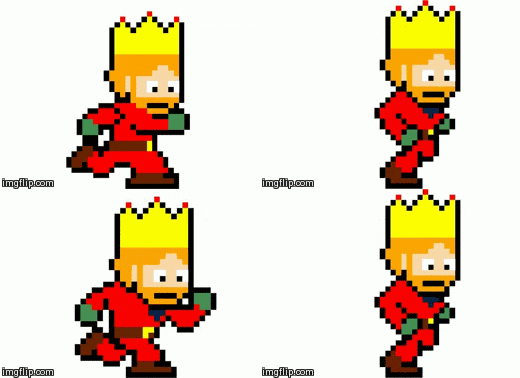 This animation is for the king's walk cycle. There is a slight problem with this gif. It appears to skip a frame or two making the cycle look kinda off. Apart from that I think this will work and suit the game very well. I worked on this cycle with Luke and we went through many changes until we thought the proportions are right and they style of the run.
Next I will have to start to work on a idle animation for when no keys are pressed and several others.
King Idle

 This is the kings Idle animation, I was unable to import this as a gif, however I am very happy with how it looks. During the design of the idle animation we went through several different looks. We originally added more frames to give him more movement. But doing this made the king not suit the game very well. So we decided to scrap the detailed frames and just stick with two.
King Attacking

Similar to the idle animation I was unable to add a gif to the blog. Looking at the images on the side its hard to see the difference. However there is a slight difference, I really like this animation, its very simple and effective. If I had more time I would go and create multiple animations for the kings attack, this is because it would just be more appealing to play.

Apart from that I am very happy with the animation at this current time. I cant wait to see how they will look in the game.
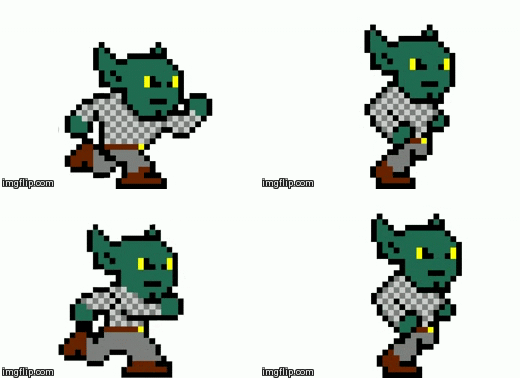
Next I will also have to work on the attack animation etc to complete the goblin.
At this current stage I am happy with how the game is coming along, I am looking forward to seeing the final outcome of the level. One thing I worrying about is the actual design of the level on unity. This process its self is going very slow and I feel that I am going to have to try to create it my self.
The Gem and Animation

This is the gem designed by Luke that I will be animating for a collect-able. I will be animating a floating cycle for when the gem is visible. Also shatter for when the gem is collected.
The part I will struggle with is making the shatter look very good.

This is the cycle for the gem animation, I really like the style of the gem. Even tho the animation is very simple I works very well with this art style. I tried out several different ways to change up the cycle like adding a shadow or making the gem rotate, but it just did not suit it.
I have shown my group the cycle and they really like the design of it.
This animation is going to be for when it is just on the level. I will be floating up and down until the player collides with it. When the player collides with it the gem will then play another animation of it shattering.
 This is the shattering cycle. I am unsure on how it looks, but from feedback everyone seemed to like it. I though it was a little to fast. Apart from that I like how it looks. This animation will be played when the player collides with the floating gem.
The program I used to make this was flash. It took a while to create this mainly because of all of the little pieces coming out of the gem. I used the lasso tool to selected sections of the shape the dragged it out slightly. I had to make multiple key frames and edit each frame. I tryed to use motion tween and shape tween, but the shape would look weird or it just would not work. Editing it frame by frame was the best bet.
The Scripts
Movement

The first script that I made is for the player movement. The code its self is very simple, what the code its self does is allows the player to move left and right, you can also jump. Another thing that I decided to do was add a freeze rotation, this was for the purpose of testing, so the cube dont roll about. If need be I can remove this if it affects the player to much. One problem with this code is that the character has got a lot of friction with the floor so they can stick to surfaces very often.
What I did next what I had to work on the code so that the game work beable to run in flash, this is because when you press play in flash it play the scene as a clip, play the game in less the a second. To solve this I had to add an action to the first layer and put stop ();, what this does it causes the aniamtion to freeze on frame one but keep all symbols etc playing in this frame.
Menu Screen
Objects for the Environment .

The image to the side is our sprites page. I created all of the ground block and flowers. The shields and flags was created my me and Luke. The blocks we have made we will be moving over to our scene to create the floor etc. This will allow us to create the environment a lot more easier then just designing everything in flash.
The designs below have been created by Luke and I.
 This was the first original design for a shield. This shield is going to be a wall decoration for the castle. This design we knew it was a bit plane, it was missing something. It had no depth and lacked detail. We had two different style to give us more of a verity on the style.

Looking at these two designs I am very happy with the outcome of it.
The designs below are us try out different colours to make the shield look better.
From the first design we decided it need depth, so we decided to add a border round the edge and then we added some symbole inside. The symbols took a while to produce because we struggled to make something look right with the pixel size we have chosen. After we decided on the overall style we then changed the colour of the symbols.
 The main reason for this is because there was too much yellow in the design. Out of the two designs on the side, we have decided to choose the bottom one. Mainly because its just more appealing to look at.
Next we will need to add the sword that we designed previous for the king and put the behind the shield.

This is the final design of the shield. I am very happy with the overall outcome of it and I think its appealing to look at. After sharing it with the rest of the group they are very happy with the overall style of it. One thing that I would say is that it has got a lot of detail in it. Comparing this to the king it will stand out a lot drawing your attention to this, rather then the king its self.
Menu Buttons.

This is the menu button for the title screen, I made this using photoshop. I imported several textures, added overlays and used the custom font. It went through many changed to get to this stage, but I am happy with how it looks. The other buttons are the same as this one but with different text on the front.
Title
 We originally had just black text over a background, but after some time and once we had the buttons, we decided we need to make a good looking title. We decided to go with this, its an open scroll with the title over it. I though this was a very good idea, however I would changed some things looking back at it now. I would ether make it look like the title was written on, or make it look like it was imprinted in.
Bushes

This is one of the bushes we are going to add into the game, the main reason for this is to stop the player from being able to run of the screen. One thing I really like about this bush is the style of it, I like how we done all of the shading. If I was to have had more time I would like to make more bushes rather then sticking with only one. The game does look very good with this included, but I feel it would look a lot better with multiple different things for the environment.
Designing the Level.

stop ();
What this does is freeze the frame it is currenly on untill its told to move on. All of the animations in the current frame will continue to play which is what I need.
Next I impoted the Goblin and the gem into the scene to give it a better look. Next I will have to include a background, and get the base code for the characters working.

This is the initial background we included into the scene. This was produced by Jordan and it added a lot of colour to the scene making it more appealing to look at. However I felt like it needed to be changed slightly, the blocks did not have enough detail in it, so it would not suit the rest of the game.
 During this stage of the game we need to add some detail to the scene to make it appealing to look at. So what I did was create some flowers, new sprite block for the ground and help design the bush to be included. It took a while to produce a lot of the objects, but once it was added it made me feel very happy with the overall style of it.

The next thing I decided to work on was the title screen. I used the same background, in the previous scene and also made several buttons and title.
To create this scene I had to add and extra scene to the start of the game. To start this I made a graphic in photoshop using multiple textures and overlays until I was happy with them. I then imported it into flash converted it into a symbol, and made it a button. I then changed the colour scheme etc on the button for when it is pressed etc. After getting the button to look good, I then need it to take you to the next page, which is the game. To do this I had to create another script for the button. The script is:
on (release) {
gotoAndStop(4);
}
The code is very simple, and easy to understand. The number at the end defines what frame the player will be taken to one it is pressed, so all I had to do if find out what frame the game is on. I then repeated this process for the other buttons.
After the buttons was complete I them imported the title, this was created by Luke using photoshop and similar techniques to what I did before. Once it was complete I just imported it into the scene. Once this was done the title page was almost complete.
The next thing I will be working on is the new background.
 This is the new background that me and Luke designed. I used the sprite block I made previous, combined with the door that Luke made and other sprites that we made together. Looking at this background I feel like this is a huge improvement then the original one. I like how each block/object has got shading in it, it makes the background feel more complete. What I need to do now is use this background to replace the other backgrounds, this is how it looks.


I dont really like how the controls page looks, I feel like it needs some else, like some better graphics a change in background, or something else just to spice it up a little. But at this current stage in time I am very happy with how the game is looking, however I feel like we a falling behind a little.
After creating setting up all of the scenes, I then decided to move onto completing all of the codes for the game.
The first thing I decided to work on was getting a camera to follow the character. It took me a while to do this, but after some time I figured out how to get this to work. This is the code I used:
onClipEvent (enterFrame) {
_y += (_root.char._y-_y)/4;
_x += (_root.char._x-_x)/4;
}
What this does it detect the king and his coordinates, the make the camera follow him. To define the king I added a tag to him called char, this was to make it easier to write the code.
Next I worked on creating a re spawner this was very simple to make and this was going to be for when the player collides with the enemy and when they fall of the map. The code I used was:
onClipEvent (enterFrame) {
if (_root.char.hitTest(this)) {
_root.char._x = charX = 121
_root.char._y = charY = 345.7
}
}
What this code does is detect if the character collides with a certain object, which in this case it was the enemy. Next I had to tell it to go back to a set place on the screen, so they can attempt it again. This code is very helpful and it allow the game to have some obstacle in the game.
After I went through many problems trying to get the character to change animation when a certain key is pressed like jump and attack. After spending hours trying to get the code to work with no luck, I ended up giving up, this is because I was starting to run out of time and a lot more was needed to complete the game.
Evaluation
Overall I am very happy with how much I have achieved thought out the development of this game. During the process of creating this game I had to take on several other roles like concept artists and level designer to finally come close to completing the game. I have learnt a lot about developing games using flash and I look foward to developing more in the future. However throughout the development of the game I came across a lot of problems that I just could not solve. One of the major problems was that I was unable to get the character animtions to change when another key was pressed, I went through several differnt codes try to figure this out and I also done some research and asked around for help, but I was unable to solve this. Some of the other problems is that a lot of our group slacked, ether they where not in or the work just did not get done. This let to us taking on many other roles just to come slightly close to completing the game. Looking at the game as a group I am not very happy with how much we have done, we do not have a complete level and the only thing the player can do is move around. If I was to produce the game next time I would rather produce this on my own, I would feel like I can get more things done, however if I had to work in a group I would heavily focus on the code, just to get the basics of the game working.
3D on my own
Sticking to the same idea I had before, the game is going to be similar to temple run.

The first thing that I did was place the flooring and walls. I arranged the walls ether side of the floor to create the scene for the game. Next applied a texture to the floor to give it more detail and then added a skybox to the scene. To add a skybox I changed the render settings and applied a material to the skybox. After I added a directional light to the scene the improted the character that was allready made in unity. After changing the positioning of the objecs in the scene I can see the game starting to take place.
Next I will have to make some codes for the ground to move. What I am planning on doing to making the ground move towards the character, the animation currently in use will make it look like he is running foward. All I will have to do after is making him move left and right, aswell as jump.
 After getting the code to work, I am starting to like how the game is looking.
The code I used is:
using UnityEngine;
using System.Collections;
public class GroundControl : MonoBehaviour {
float speed = .5f;
void Update () {
float offset = Time.time * speed;
renderer.material.mainTextureOffset = new Vector2(0, -offset);
}
}
What this code does is not make the ground move, but make the texture move that is on the ground. Doing this will save me a lot of time because this will give the illusion that the player is running foward when they are not. It will also make it so that the floor will not have to be endless.
Next I will be working on the enviromental objects, like coins etc. I will be using cinema 4d to create these objects and import them over to unity.
The objects that I have made are a coin, this will allow the player to gain some score while plaing through the game. There is also a barrier, this will add some challenge to the game, finally I have also made a power up for the player to make the stronger.
Now I will have to create some scripts for the objects to the player can interact with them.


At this current stage in time I am happy with the overall progress of the game, but I think that I will struggle to get the script to work propperly. This is because I am unsure on the problem, I might have to change the whole code if I cant find a soloution.

After creating this there was still one problem I needed to solve, this was too many objects being in the scene at one time. To solve this I would need to make something that would destroy the objects when they collide with it off screen. To do this I placed a cube, extended it, then added a tag to the block called destroyer, similar to my original 3D game then added some code so that when the objects collide with it they will be destroyed. Doing this will make the game playable.
 What I need to do next is get a timer, score and a game over screen. The reason for the timer is because everytime the player collects a coin the timer will increase in time, as he collides with the obstical the timer will be reduced. The player will have to collects as many coins as possible to keep the timer up while avoiding the barriers. The players score will increase overtime, so the longer they last the higher their score will be. After the timer hits 0 I will need to put in a game over screen, this will then give the player the option to go back to the main menu, retart and also to exit. At this current stage in time there are several errors with the game. One of the is the spawning. The player can't collide with the coins so they can't increase their time, so at this moment in time they can only live for a set time limit.
Next I will be working on the overall look of the game, I will be changing the way the gameover screen looks, the score etc. This is just to make it more appealing to look at. I also might end up adding some enviromental objects to the side of the environment to make it look better rather then having just a wall.

To create this menu I had to create a GUI skin. In the menu of the GUI skin I am able to change the font colour, etc to change up the style of the skin. After doing that I then had to change one of my scripts I made previous, in this script I had to make it detect the GUI skin, I can do this by adding public GUISkin skin to the top of the script, then also add some other part to the code so I was able to add the background. Now if I select the script in the Hierachy I can add a background to the game over screen.
The next thing I will be working on is the pause screen of the game. To do this I will have to add a pause function to one of my scripts.
 This is the pause menu, I decided to keep the background, font etc the same to save time. Creating this menu I came across severall problems, after getting the menu to work, the character its self will pause and so will most of the game. One thing that would not is the object, they would carry on moving and spawning. After some time I figured out that if I go into the objects scripts I had to add an option so that when the pause menu is enabled that the timescale for them should be set to 0. This solved my problem.
To get the menu to work its very simple really. In the code similar to the game over screen I had to make it detect my GUI skin to add some detail to the menu. Next I had to add an option that if the esc key is pressed the game will pause. I had to add several if else statements, it was if the esc key is pressed the timescale would be set to 0. Then I had to make it enable the GUI skin if the timescale was set to 0.
After getting this to work I am very happy with the overall outcome of the menu. It works very well, but I could do with some of the colour scheme and style being changed.
Next I will be adding a main meun screen to give the game a better feel on launch up.
 I had a lot of trouble with this part of the game. To make the menu its self was very easy. I just copyed the same script I used for the game over screne and used that. I changed little bits of the code to suit it better. The problem I had was linking the two different scenes together. I kept on getting an error saying something like "level "menu (-1) couldn't ne loaded because it has not been added to the build settings." After doing some research I though I just had to change the name of the scene in the code to detect the other scene, but that was not the case. For it to work I had to change the build settings and inlude both scenes into this. It took me longer then it should have to figue this out, but now it works and im happy with the outcome.
If I have enough time left I will have to go back over the spawning code and try to make the objects move towards the character. Once that is done I will then start to work on the other menu options like controls. credits etc just to make the game more visually appealing.
 While looking through many of the object, scripts etc I finally found out what was wrong with the spawning. For some reason I did not attach the obsticle and powerup script on to the object. This would have stopped them from moving, another thing I had to change was take off the gravity and enable the trigger option on them. After some time the game is now almost complete. There is still one problem that im struggling to fix. This is that when ever the player collides with the object nothing happens with the timer. It should increase when the player collides with the coin and decrease when he hits the barrier. The scripts look like it all should work, but Im unsure on the cause for this. Hopefully I am able to solve this problem because I feel like the game work work well if its done.
Evaluation
After reaching the deadline, I am happy with how much I have produced and how well the game its self works. There are several problems in the game like when you collect a coin the timer does not increase and when you hit a barrier the timer does not go down. I feel like if that was working the game would work very well. If I had more time I think I would spend a lot of it getting the time working, after that was done I would then move on to the overal look. I would spend my time creating some kind of environment around the player to make it more appealing to look at. Another thing I would change is the obstacles, the angle they are facing needs to be changed, for some reason when I added the code it would only move in one direction, so I had to rotate the object for it to move in the right direction. Overall I had a lot of fun creating this game and im considering doing my final major project using unity.
Over the whole unit I am very happy with how much I have learnt, I have developed my skills a lot using flash and unity and i have greatly developed my skills in coding. I feel like I am now able to produce a working game with a lot more ease now unlike when I first started this unit.

No comments:
Post a Comment